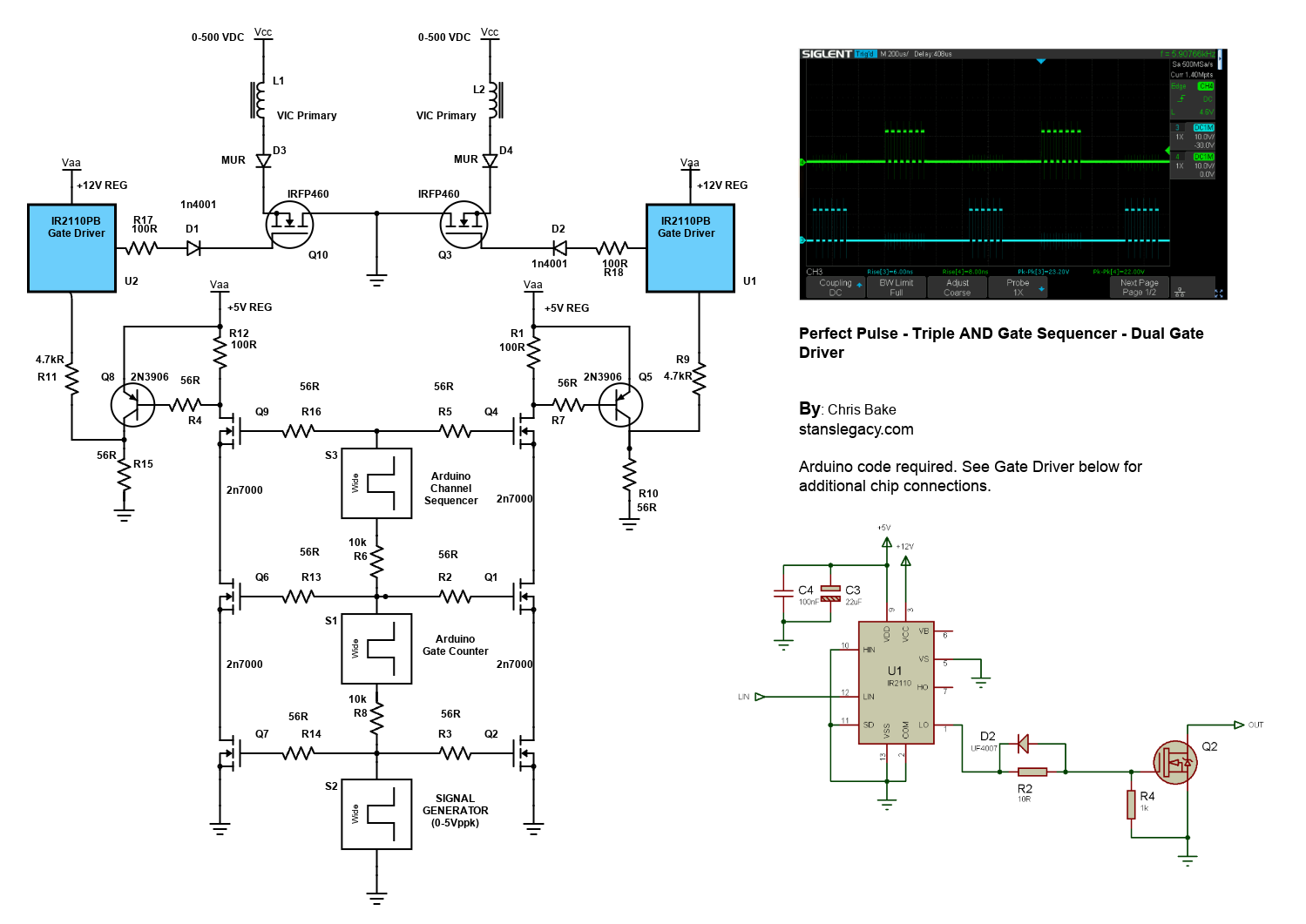
# 2 Arduino - Dual Channel - Triple AND Gate (Perfect Pulse Driver)

By: Chris Bake

**Arduino Code**: [https://bitbucket.org/cbake6807/dualtripleseq/src/master/](https://bitbucket.org/cbake6807/dualtripleseq/src/master/)

#### Parts List

1. **External Signal Generator**: 0-5Vppk output.
2. **Power Supply**: ATX is ideal, providing +5V REG and +12V REG.
3. **2N7000 Signal MOSFETs**: Quantity 6.
4. **IRFP460 or Similar Power N-channel MOSFET**: Quantity 2.
5. **56Ω 1/8W Resistors**: Quantity 10.
6. **100Ω 1/2W Resistors**: Quantity 2.
7. **4.7kΩ Resistors**: Quantity 2.
8. **2N3906 PNP General Purpose Transistor**: Quantity 2 (can be substituted with any general PNP transistor).
9. **IR2110PB Gate Driver Chip 14-pin**: Quantity 2.
10. **Arduino Nano (or similar)**: Quantity 2 (must support hardware PCNT).
11. **Rotary Encoder**: Quantity 1.

#### Software Requirements

- **Arduino IDE**: Ensure it is installed and updated to the latest version.
- **Encoder Library**: Install via the Arduino Library Manager.

###   


### Arduino Setup

#### Pulse Counter Arduino

1. **Upload Script**
    
    
    - Open the Arduino IDE.
    - Connect the first Arduino (PulseCounter) to your PC.
    - Open `PulseCounter.ino` from the provided file.
    - Upload the script to the Arduino.
2. **Connect the Encoder**
    
    
    - Connect the encoder's VCC to the Arduino's 5V pin.
    - Connect the encoder's GND to the Arduino's GND pin.
    - Connect the encoder's CLK and DT pins to two digital pins on the Arduino D2 and D3.
    - Connect the encoder's Button pin to <span style="background-color: #fbeeb8;">D4</span>.
3. **Verify Encoder Output**
    
    
    - Open the Serial Monitor in the Arduino IDE.
    - Rotate the encoder and check the output to confirm it is functioning correctly.

> <div>const int outputPin = 9;</div><div>const int encoderPinA = 2;</div><div>const int encoderPinB = 3;</div><div>const int encoderSwitchPin = 4;</div><div>const int disableSwitchPin = 6;</div>

#### Adding a Pushbutton for Sync Mode Toggle

To add a pushbutton to the Sequencer Arduino for toggling the sync mode, follow these instructions:

##### Parts Required

- **Pushbutton**: Quantity 1
- **10kΩ Resistor**: Quantity 1
- **Connecting Wires**

##### Hardware Connections

1. **Connect the Pushbuttons**
    
    
    - NANO1 - <span style="background-color: #fbeeb8;">D6</span> -&gt; BUTTON -&gt; GND
    - NANO2 - <span style="background-color: #fbeeb8;">D4</span> -&gt; BUTTON -&gt; GND

<p class="callout info">Summary of Connections</p>

#### Sequencer Arduino

1. **Upload Script**
    - Disconnect the PulseCounter Arduino and connect the second Arduino (Sequencer) to your PC.
    - Open `Sequencer.ino` from the provided file.
    - Upload the script to the Arduino.

### Pin Mapping and Connections

#### Connecting the Two Arduinos

- **PulseCounter Arduino to Sequencer Arduino**
    
    
    - Signal Generator (+5Vppk max) →PulseCounter NANO1 - D5 (Input) 
        - Signal Generator (+5Vppk max)→Q2 **First** 2N7000 FET Gate
        - Signal Generator (+5Vppk max)→Q7 **First** 2N7000 FET Gate (opposite branch)
    - PulseCounter NANO1 - D9 (Output) → Sequencer NANO2 - D2 (Input) 
        - PulseCounter NANO1 - D9 (Output) → Q1 **Second** 2N7000 FET Gate
        - PulseCounter NANO1 - D9 (Output) → Q6 **Second** 2N7000 FET Gate (opposite branch)
- **Sequencer Arduino Outputs**
    
    
    - Sequencer NANO2- D9 (Output) → Input to Q4 - **Third** 2N7000 Gate.
    - Sequencer NANO2 - D10 (Output) → Input to Q9 - **Third** 2N7000 Gate (opposite branch)
- **Gate Enable/Disable Button**
    - Connect NANO1 - D6 -&gt; BUTTON -&gt; GND
- **SyncMode / Offset Mode Button**
    - Connect NANO2 - D4 -&gt; BUTTON -&gt; GND

<p class="callout danger">**Note:** The schematic shows the outputs merged due to limitations, but there should be dual outputs from the sequencer, D9 and D10, each connecting to a separate AND gate tree.</p>

- **Shared Connections**
    - Both Arduinos' GND pins should be connected together to ensure a common ground.

### Gate Driver Chip Connections

#### IR2110PB Gate Driver Chip

1. **Power Connections**
    
    
    - VCC (Pin 3) → +12V REG
    - VSS (Pin 2, 10, 11, 15) → GND
    - VDD (Pin 9) +5V REG
2. **Input Connections**
    
    
    - LIN (Pin 12) → Arduino PWM pin (as per script)
3. **Output Connections**
    
    
    - LO (Pin 1) → Gate of the IRFP460 MOSFET
4. **Bootstrap Capacitor**
    
    
    - Connect a 22µF and a 100nF capacitor near VDD (Pin 9) and Ground.
5. **No Connection**
    1. Pin 6, 7 - NC
6. **Noise Filtering**
    
    
    - R2: Connect a 10Ω resistor between LO and the gate of the MOSFET.
    - D2: Place a 1N4001 diode in parallel with the Resistor R2 in reverse direction for added noise filtering and protection.

### Schematic Overview

Refer to the schematic image to visualize these connections. The IR2110PB gate driver chips control the IRFP460 MOSFETs, enabling high-power switching of the VIC (Voltage Intensifier Circuit) primaries.

### Additional Notes

- **Resistor Tolerances**: The resistors can have a large tolerance. The 56Ω value is selected to preserve signal clarity. Any value ≤220Ω should be acceptable.
- **Merged Outputs**: The Arduino Channel Sequencer has 2 outputs shown merged due to Scheme-It limitations.

[![image-1719630807457.png](https://stanslegacy.com/uploads/images/gallery/2024-06/scaled-1680-/3tIVYmfAyboOM3bo-image-1719630807457.png)](https://stanslegacy.com/uploads/images/gallery/2024-06/3tIVYmfAyboOM3bo-image-1719630807457.png)