
ESP32 - Complex Waveform Generator V2
Setting Up The App
Modify ESP C+ Code to configure local network settings
Determine your local network's Subnet range (It should be one of these: 10.0.0.0/8, 192.168.0.0/16, or 172.xxx.xxx.xxx)See:https://www.businessinsider.com/how-to-find-ip-address-of-routerWrite down the address of your Gateway (your Router's IP address)
Find a free DHCP issued internal IP address on your local network (Guess an IP not in use by picking a number between 100 and 255 for the very last position in your subnet: 192.168.1.xxx)Find your WIFI SSID and PasswordSSID = The name of your Wifi Connection as your Phone or PC would see it on the network connection browserPassword = Your Wifi Password
Configure the IP, Gateway and your Wifi SSID & credentials into the ESP code belowPreview Of areas to change in code below:// #### Change Me #### const char *SSID = "NETGEAR"; const char *PWD = "12345678"; // Don't Change Me const char *ASSET_HOST = "https://wavegenjs.s3.amazonaws.com"; // Web server running on port 80 WebServer server(80); // #### CHANGE ME #### // Set your Static IP address IPAddress local_IP(192, 168, 1, 8); // Set your Gateway IP address IPAddress gateway(192, 168, 1, 1);
Copy the full script (down below) and paste it into your Arduino IDECompile and Upload the code to the ESP32Install required libraries (FreeRTOS, ArduinoJSON, Wifi, and WebServer.)Observe the Serial Monitor Log output from the Arduino IDEConfirm network connectivity was established with your router.
Connect 2 separate Oscilloscope probes to pins "0" and "2" to ground, on your ESP.Open a web browser on a computer connected to the same internal network as the ESP was givenGo to the ESP's given IP Address:http://192.168.1.8
Enjoy! (if it works)


Troubleshooting:
View the Console Log for errors in your browser while clicking the app's sliders buttons etc..
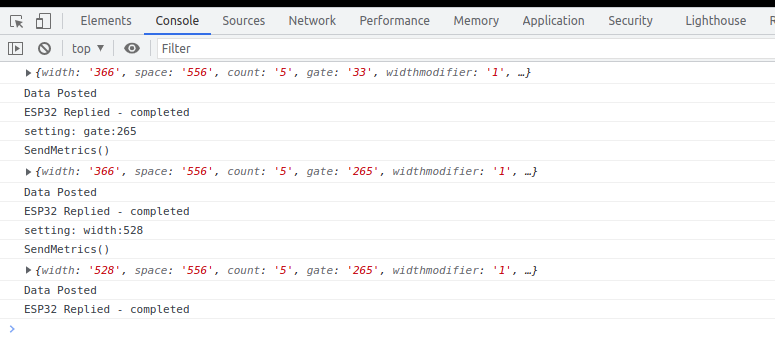
Confirm the ESP is a connected host in your network and was given the IP you specified
https://www.wikihow.com/See-Who-Is-Connected-to-Your-Wireless-Network
# ESP32 Complex Waveform Generator
Arrangement for WROOM-32 or WROVER-E (DevKit-C)

```
# PARTS Required
1 - ESP32 (WROOM-32 or WROVER-32) with 16 exposed pins
7 - Rotary Encoders (i.e. KY-040 Rotary Encoder Module CYT1062)
1 - +5VREG 1A Power Supply for ESP32 (ATX PowerSupply)
```

### Installation Prerequisites
Install ESP C+Libraries Code
in # ESP32 Complex Waveform Generator
Arrangement for WROOM-32 or WROVER-E (DevKit-C)
```
# PARTS Required
1 - ESP32 (WROOM-32 or WROVER-32) with 16 exposed pins
7 - Rotary Encoders (i.e. KY-040 Rotary Encoder Module CYT1062)
1 - +5VREG 1A Power Supply for ESP32 (ATX PowerSupply)
```
### Installation Prerequisites
Install ESP C+Libraries CodeExpand
#includeArduino-IDE
<Arduino.h>```
#includeArduinoJson
<WiFi.h>ESP32Encoder
#include```

<WebServer.h>### #includeStep <ArduinoJson.h>1. #includeOpen <FreeRTOS.h>Esp32Full.ino TaskHandle_tand pulseTaskHandle;set Wifi Credentials
```
// #### Change Me - Local Wifi Info ####
const char *SSID = "NETGEAR";
const char *PWD = "12345678";
//```

Don't### ChangeStep Me2. //constConfigure charfree *ASSET_HOSTlocal =LAN  "https://wavegenjs.s3.amazonaws.com";IP constaddress
charCheck *ASSET_HOSTyour =Router "http://192.168.1.2";for //more Webinformation
server running on port 80
WebServer server(80);```
// #### CHANGE ME ####
// Set your Static IP addresaddress to a free IP in your local network
IPAddress local_IP(192, 168, 1, 8);
// Set your Gateway IP address
IPAddress gateway(192, 168, 1, 1);

IPAddress subnet(255, 255, 255, 0);
IPAddress primaryDNS(8, 8, 8, 8);   //optional
IPAddress secondaryDNS(8, 8, 4, 4); //optional
```

### Step 3. Configure ESP_HOST in Javascript File
Edit `./assets/espwavegen.js` and set the IP address used in Step 2 above.
###### TODO: Make configurable in the web interface
```
# Set this to the ESP32's IP address
ESP_HOST = "http://192.168.1.8";
JSON```
dataSave bufferand StaticJsonDocument<500close the file

### Step 4. Upload The code in `Esp32Full.ino`
Paste the code into your Arduino-IDE and upload it to your ESP32


### Step 5. Access the WebApp in your Web Browser
Open Web Browser

Open `index.html` in the `WebApp` directory below this file
```
File -> jsonDocument;Open char-> buffer[500];Browse to WebApp/index.html -> Open
```

Interface is now displayed!

Enjoy!!


##  Additional Troubleshooting / Customization


##### Optional: Configure alternate Output Pins
-- Output will be on Pins D2 and D4 by default
```
// env#### variableOutput floatPins width####
int pinChannel1 = 150;2;
floatint spacepinChannel2 = 150;4;
float```

width1#### Optional: Adjust Encoder Pins if needed
```
int pulseCount_EncoderPIN1 = 0;14;
floatint space1pulseCount_EncoderPIN2 = 0;13;
floatint widthelongationmodifierpulseWidth_EncoderPIN1 = 1;35;
floatint spaceelongationmodifierpulseWidth_EncoderPIN2 = 1;34;
floatint gatepulseSpace_EncoderPIN1 = 1;19;
int countpulseSpace_EncoderPIN2 = 18;
int gate_freq_EncoderPIN1 = 22;
int gate_freq_EncoderPIN2 = 23;

int pulseWidthModifier_EncoderPIN1 = 27;
int pulseWidthModifier_EncoderPIN2 = 26;
int pulseSpaceModifier_EncoderPIN1 = 5;
int enablegatepulseSpaceModifier_EncoderPIN2 = 1;32;
int channelsgateModifier_EncoderPIN1 = 2;25;
int reference1gateModifier_EncoderPIN2 = LOW;33;
int```
reference2ESP intC+ enablealternateCode
Git 0;Repo: int invertOne = 0;
int invertTwo = 0;
int ch1lastState = LOW;
int ch2lastState = LOW;
void connectToWiFi() {
Serial.print("Connecting to ");
Serial.println(SSID);
// Configures static IP address
if (!WiFi.config(local_IP, gateway, subnet, primaryDNS, secondaryDNS)) {
Serial.println("STA Failed to configure");
}
WiFi.begin(SSID, PWD);
while (WiFi.status() != WL_CONNECTED) {
Serial.print(".");
delay(500);
}
Serial.print("Connected. IP: ");
Serial.println(WiFi.localIP());
}
void setup_routing() {
server.enableCORS();
server.on("/metrics", getMetrics);
server.on("/set", HTTP_POST, handlePost);
server.on("/", getIndex);
server.begin();
}
void create_json(float width, float space, float count, float gate, float enablegate, float channels, float widthelongationmodifier, float spaceelongationmodifier, float enablealternate, int invertOne, int invertTwo) {
jsonDocument.clear();
jsonDocument["width"] = width;
jsonDocument["space"] = space;
jsonDocument["widthelongationmodifier"] = widthelongationmodifier;
jsonDocument["spaceelongationmodifier"] = spaceelongationmodifier;
jsonDocument["count"] = count;
jsonDocument["gate"] = gate;
jsonDocument["enablegate"] = enablegate;
jsonDocument["channels"] = channels;
jsonDocument["enablealternate"] = enablealternate;
jsonDocument["invertOne"] = invertOne;
jsonDocument["invertTwo"] = invertTwo;
serializeJson(jsonDocument, buffer);
}
String getHtml() {
String ptr = "<!DOCTYPE html> <html>\n";
ptr +="<head><meta name=\"viewport\" content=\"width=device-width, initial-scale=1.0, user-scalable=no\">\n";
ptr +="<title>ESP32 Complex Waveform Generator</title>\n";
ptr +="<script src=\"https://code.jquery.com/jquery-3.6.0.min.js\"bitbucket.org/cbake6807/esp32-complex-waveform-generator/src/master/
crossorigin=\"anonymous\"></script>";
ptr +="<link href=\"https://cdn.jsdelivr.net/npm/bootstrap@5.2.0/dist/css/bootstrap.min.css\" rel=\"stylesheet\" crossorigin=\"anonymous\"><script src=\"https://cdn.jsdelivr.net/npm/bootstrap@5.2.0/dist/js/bootstrap.bundle.min.js\" crossorigin=\"anonymous\"></script>";
ptr +="<script src=\"https://code.highcharts.com/highcharts.js\"></script>";
ptr +="<link href=\"";
ptr += ASSET_HOST;
ptr += "/espwavegen.css\" rel=\"stylesheet\"><script src=\"";
ptr += ASSET_HOST;
ptr += "/espwavegen.js\"></script>";
ptr +="</head><body><div id=\"mainBody\"></div><div id=\"pulseChart\"></div><div id=\"widthChart\"></div></body></html>\n";
return ptr;
}
void getIndex() {
server.send(200, "text/html", getHtml());
}
void getMetrics() {
create_json(width, space, count, gate, enablegate, channels, widthelongationmodifier, spaceelongationmodifier, enablealternate, invertOne, invertTwo);
server.send(200, "application/json", buffer);
}
void handlePost() {
if (server.hasArg("plain") == false) {
Serial.println("no plain mode");
}
String body = server.arg("plain");
deserializeJson(jsonDocument, body);
width = jsonDocument["widthtotal"];
space = jsonDocument["spacetotal"];
widthelongationmodifier = jsonDocument["widthelongationmodifier"];
spaceelongationmodifier = jsonDocument["spaceelongationmodifier"];
count = jsonDocument["count"];
gate = jsonDocument["gatetotal"];
enablegate = jsonDocument["enablegate"];
channels = jsonDocument["channels"];
invertOne = jsonDocument["invertOne"];
invertTwo = jsonDocument["invertTwo"];
enablealternate = jsonDocument["enablealternate"];
serializeJson(jsonDocument, buffer);
server.send(200, "application/json", buffer);
}
void customDelay(long delayValue)
{
long i = 0;
int x = 0;
for(i=0;i<delayValue;i++){
for(x=0;x<80;x++){
__asm__("nop\n\t");
}
}
}
void pulseClock(void * parameter) {
Serial.println("restart loop");
for(;;){ // ** Start of infinite loop **
if(invertOne) {
if(ch1lastState == LOW){
ch1lastState = HIGH;
} else {
ch1lastState = LOW;
}
}
if(invertTwo) {
if(ch2lastState == LOW){
ch2lastState = HIGH;
} else {
ch2lastState = LOW;
}
}
width1 = width;
space1 = space;
for(int i=0; i<count; i++){
digitalWrite(2, ch2lastState);
digitalWrite(0, ch1lastState);
customDelay(width1);
// ch1lastState = !ch1lastState;
// ch2lastState = !ch2lastState;
digitalWrite(2, !ch2lastState);
digitalWrite(0, !ch1lastState);
customDelay(space1);
digitalWrite(2, ch2lastState);
digitalWrite(0, ch1lastState);
width1 = width1 * widthelongationmodifier;
space1 = space1 * spaceelongationmodifier;
}
if(enablegate){
if(enablealternate) {
if(reference1 == HIGH){
reference1 = LOW;
reference2 = HIGH;
} else {
reference1 = HIGH;
reference2 = LOW;
}
digitalWrite(2, reference1);
digitalWrite(0, reference2);
}
customDelay(gate);
}
}
vTaskDelete(NULL);
}
void setup() {
Serial.begin(115200);
Serial.println("setup");
connectToWiFi();
setup_routing();
pinMode(2, OUTPUT);
pinMode(0, OUTPUT);
pinMode(19, OUTPUT);
pinMode(21, OUTPUT);
digitalWrite(2, LOW);
digitalWrite(0, LOW);
digitalWrite(19, LOW);
digitalWrite(21, LOW);
xTaskCreatePinnedToCore(pulseClock,"Pulse Clock",10000,NULL,1,&pulseTaskHandle,1);
}
void loop() {
server.handleClient();
}