
ESP32 - Complex Waveform Generator V2
Setting Up The App
ESP32 Complex Waveform Generator - Arrangement for WROOM-32 or WROVER-E (DevKit-C)
# PARTS Required
- 1 - ESP32 (WROOM-32 or WROVER-32) with 16 exposed pins
- 1 - ES32 Breakout Board or equivalent pin header block
- 7 - Rotary Encoders (i.e. KY-040 Rotary Encoder Module CYT1062)
- TODO: add >= 2 more for Elongation adjustments.
- 1 - +5VREG 1A Power Supply for ESP32 (i.e. ATX PowerSupply)
Installation Prerequisites
Install ESP Libraries in Arduino-IDEArduinoJsonESP32Encoder```
###
ArduinoJson
ESP32Encoder
Step 1. Open Esp32Full.ino and set Wifi Credentials
```
// #### Change Me - Local Wifi Info ####

const char *SSID = "NETGEAR";

const char *PWD = "12345678";
```
###
Step 2. Configure free local LAN IP address
Check your Router for more information```
// #### CHANGE ME ####

// Set your Static IP address to a free IP in your local network

IPAddress local_IP(192, 168, 1, 8);

// Set your Gateway IP address

IPAddress gateway(192, 168, 1, 1);

IPAddress subnet(255, 255, 255, 0);

IPAddress primaryDNS(8, 8, 8, 8);   //optional

IPAddress secondaryDNS(8, 8, 4, 4); //optional
```
###
Step 3. Configure ESP_HOST in Javascript File
Edit `./assets/espwavegen.js` and set the IP address used in Step 2 above.######
TODO: Make configurable in the web interface```
# Set this to the ESP32's IP address

ESP_HOST = "http://192.168.1.8";
```
Save and close the file
###
Step 4. Upload The code in `Esp32Full.ino`
Paste the code into your Arduino-IDE and upload it to your ESP32
###
Step 5. Access the WebApp in your Web Browser
Open Web Browser
Open `index.html` in the `WebApp` directory below this file```
- File -> Open -> Browse to WebApp/index.html -> Open
```
Interface is now displayed!
Enjoy!!
## Additional Troubleshooting / Customization
##### Optional: Configure alternate Output Pins
--
- Output will be on Pins D2 and D4 by default
```
// #### Output Pins ####

int pinChannel1 = 2;

int pinChannel2 = 4;
```
####
Optional: Adjust Encoder Pins if needed
```
int pulseCount_EncoderPIN1 = 14;

int pulseCount_EncoderPIN2 = 13;

int pulseWidth_EncoderPIN1 = 35;

int pulseWidth_EncoderPIN2 = 34;

int pulseSpace_EncoderPIN1 = 19;

int pulseSpace_EncoderPIN2 = 18;

int gate_freq_EncoderPIN1 = 22;

int gate_freq_EncoderPIN2 = 23;

int pulseWidthModifier_EncoderPIN1 = 27;

int pulseWidthModifier_EncoderPIN2 = 26;

int pulseSpaceModifier_EncoderPIN1 = 5;

int pulseSpaceModifier_EncoderPIN2 = 32;

int gateModifier_EncoderPIN1 = 25;

int gateModifier_EncoderPIN2 = 33;
```
ESP C+ Code
Git Repo: https://bitbucket.org/cbake6807/esp32-complex-waveform-generator/src/master/
Troubleshooting:
View the Console Log for errors in your browser while clicking the app's sliders buttons etc..
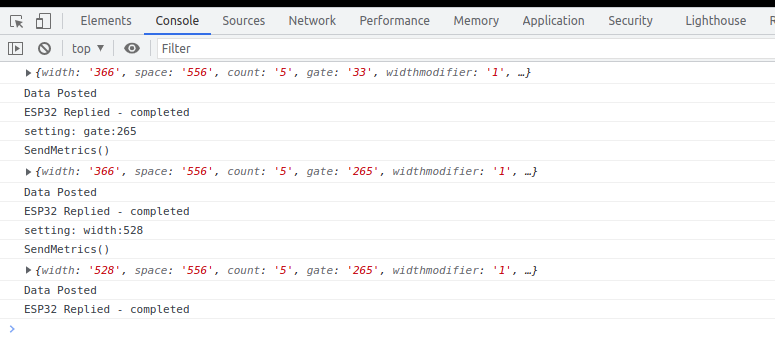
Confirm the ESP is a connected host in your network and was given the IP you specified
https://www.wikihow.com/See-Who-Is-Connected-to-Your-Wireless-Network